
MICROWAVE
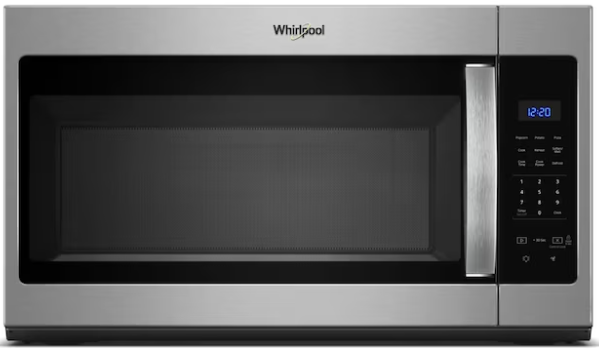
Whirlpool Over-the-Range
Operating guide for the Whirlpool 1.7 cu ft over-the-range microwave, including cooking, defrost, preset programs, and the ventilation fan.
01
Basic cooking
- Open the door and place food in the center of the turntable. Use a microwave-safe container — no metal, foil, or dishes with metallic trim.
- Close the door firmly.
- Enter your cook time using the number pad. For example, press 1, 3, 0 for one minute and thirty seconds.
- Press Start. The turntable will rotate and the interior light will come on.
- The microwave will beep when the timer ends. Remove food carefully — the contents and container can be very hot.
Quick 30-second start
Press Start once without entering a time to begin cooking at full power for 30 seconds. Each additional press adds another 30 seconds to the active cook time.
Pausing and canceling
Press Stop/Cancel once to pause a cook in progress. Press it a second time to cancel entirely and clear the display.
Covering food
Cover food with a microwave-safe lid or paper towel while cooking to contain splatter. Leave a small vent gap so steam can escape — do not seal containers completely.
02
Power levels
The microwave has ten power levels. The default is level 10 — full power — which is appropriate for most cooking. Lower levels are useful for delicate tasks where full power would cause uneven heating or overcooking.
| Level | Power | Best for |
|---|---|---|
| 10 | 100% | Boiling water, reheating most foods, cooking vegetables |
| 7 | 70% | Reheating dense or layered dishes, cooking fish or poultry |
| 5 | 50% | Melting butter or chocolate, softening cream cheese |
| 3 | 30% | Defrosting, warming bread gently |
| 1 | 10% | Keeping food warm without continued cooking |
Setting a power level
- Enter the cook time using the number pad.
- Press Power Level.
- Press the number corresponding to the level you want (for example, 7 for 70%).
- Press Start.
03
Preset programs
The control panel has one-touch preset buttons for common tasks. Press the corresponding button, enter a quantity if prompted, and press Start.
Popcorn
Place one bag of microwave popcorn flat on the turntable with the instructions side up. Press Popcorn and then Start. Stay nearby and stop the microwave when popping slows to one or two pops per second — do not wait for it to stop completely, as bags can scorch quickly.
Potato
Pierce each potato several times with a fork before placing it in the microwave. Press Potato, enter the number of potatoes (1–6), and press Start. The sensor will calculate the time automatically.
Reheat
For a plate of leftovers, press Reheat and then Start. The sensor detects steam released by the food and adjusts cooking time automatically. Stir or rotate food halfway through if it has not been prompted.
Frozen entree
For single-serving packaged frozen meals, press Frozen Entree, enter a quantity if prompted, and press Start. Always check the food is heated through before eating — frozen meals vary significantly in density and composition.
Beverage
For a mug of coffee, tea, or soup. Press Beverage, enter the number of mugs (1–2), and press Start. Use caution when removing — the liquid can be very hot and may superheat without showing obvious signs of boiling.
04
Defrost
Auto defrost by weight
- Press Auto Defrost.
- Enter the weight of the food in pounds using the number pad (for example, press 1, 2 for 1.2 lbs).
- Press Start. The microwave calculates time and power automatically.
- The microwave will pause mid-cycle and prompt you to turn the food over. Do so, then press Start to continue.
After defrosting
Check that food is evenly thawed before cooking. Thin edges may be fully defrosted while the center is still icy — allow the food to stand for a few minutes or finish with a short manual defrost at power level 3. Cook defrosted food promptly and do not refreeze without cooking first.
05
Ventilation fan and surface light
Because the microwave is mounted over the range, it includes an exhaust fan that vents cooking steam and odors, and a surface light that illuminates the cooktop below.
Ventilation fan
Press the Fan or Vent Fan button to cycle through speeds: Off → Low → High → Off.
- Use High when cooking at high heat on the range below — it captures steam, smoke, and grease.
- Use Low for lighter tasks or to clear lingering odors after cooking.
- Run the fan for a minute or two after cooking finishes to clear residual steam from the cooktop area.
The fan may turn on automatically if the sensor detects excessive heat rising from the cooktop below. This is normal — it will shut off on its own once temperatures drop.
Surface light
Press the Light button to cycle through: Off → Night Light → Full On.
- Night Light provides a low-level glow for general kitchen visibility.
- Full On provides direct illumination of the range below — useful while actively cooking.
06
Care and cleaning
Interior
Wipe the interior with a damp cloth or sponge after use. For splattered food, place a microwave-safe bowl of water inside and run on full power for two minutes to loosen residue with steam, then wipe clean.
Turntable
The glass turntable tray and the plastic ring it rests on can both be removed for cleaning. Wash with warm soapy water, rinse, and dry before reinstalling. The tray is also dishwasher safe.
Door and exterior
Wipe the door and exterior with a damp cloth. For the stainless steel door, wipe in the direction of the grain to avoid streaking. Avoid abrasive cleaners or pads on any surface.
Grease filters
The grease filters on the underside of the microwave trap cooking grease from the range below. Pull each filter down by its tab to remove, wash with warm soapy water or run through the dishwasher, rinse well, and slide back into place. Check them monthly, or more often if you cook frequently on the range.
07
Troubleshooting
Microwave runs but food does not heat
Check that the power level is not set very low. At level 1 (10%), very little heat is generated. Press Stop/Cancel and re-enter the cook time at the default power level.
Sparking inside the microwave
Stop the microwave immediately. Check for metal — foil, dishes with metallic trim, twist ties, or metal utensils. Remove the metallic item and inspect the interior for damage before using again. Let us know if sparking continues or you notice burn marks inside.
Turntable is not rotating
Open the door, remove the glass tray, check that the turntable ring is seated correctly in its track, and replace the tray. A large container can also block rotation — this is acceptable for short reheats, but rotate food manually halfway through.
Fan runs after cooking ends
This is normal. The microwave runs the fan automatically to cool the interior or respond to heat from the range below. It will stop on its own.
Display shows an error code
Press Stop/Cancel to clear the display and try again. If the error returns, note the code and let us know — we can reference the manual for that specific code.
Still having trouble?
Please contact us through the booking platform. We're happy to help.